Filmic

How might we reimagine booking movie tickets?

How might we reimagine
booking movie tickets?

How might we reimagine
booking movie tickets?

Filmic

How might we reimagine
booking movie tickets?

Filmic

How might we reimagine
booking movie tickets?

Role

UX Research

UI Design

Duration

4 weeks

Responsibilities

Conducting user interviews

Paper and Digital wireframing

Data gathering and analysis

Creating the design system

Tools

Figma

Adobe creative suite

Project Overview

In today’s world, the amount of distractions that we have are endless. Imagine trying to look for a movie to watch, you click on a trailer and before you know it, you’re 45 minutes into watching cute cat videos. This is a pretty problematic. Enter Filmic.

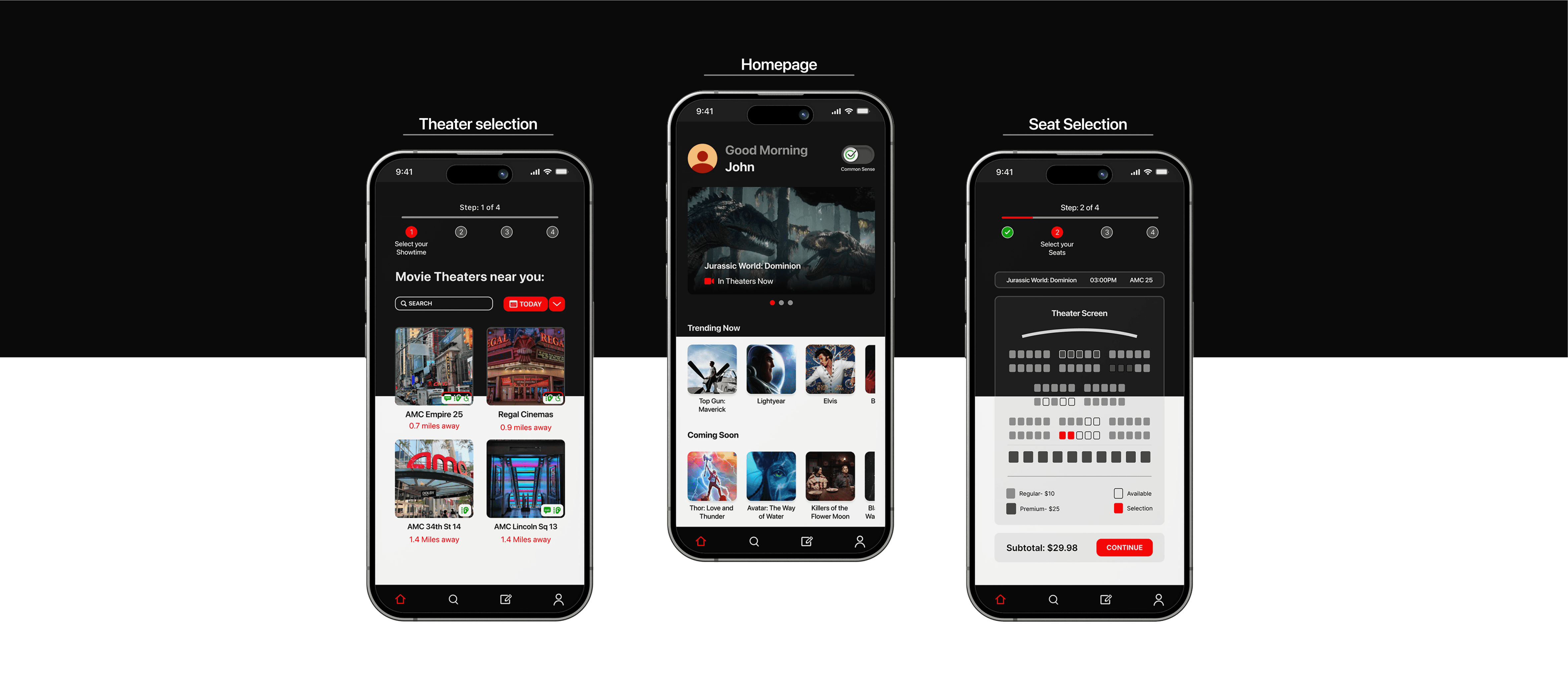
Filmic is an iOS app that was created for viewing movie trailers and booking tickets, all in one place. It takes you from trailer to theater in record time.

Scope

Problem

Users frequently struggle with navigating multiple applications to complete the process of viewing trailers and purchasing tickets.

User goals

Ability to watch movie trailers and book tickets without getting distracted. Ability to find age-appropriate movies for children based on standardized metrics and user reviews.

Product goals

Ability to provide personalized recommendations based on user indicated interests. Unification of the experience of viewing trailers and ticketing in one space, so users don't have to switch between apps.
Research

Research

Research

Research

Research

The main research for this project was done through user interviews and competitive audits. Doing these were crucial to understanding what the pain points the users had with existing applications and how they could be improved.

User research

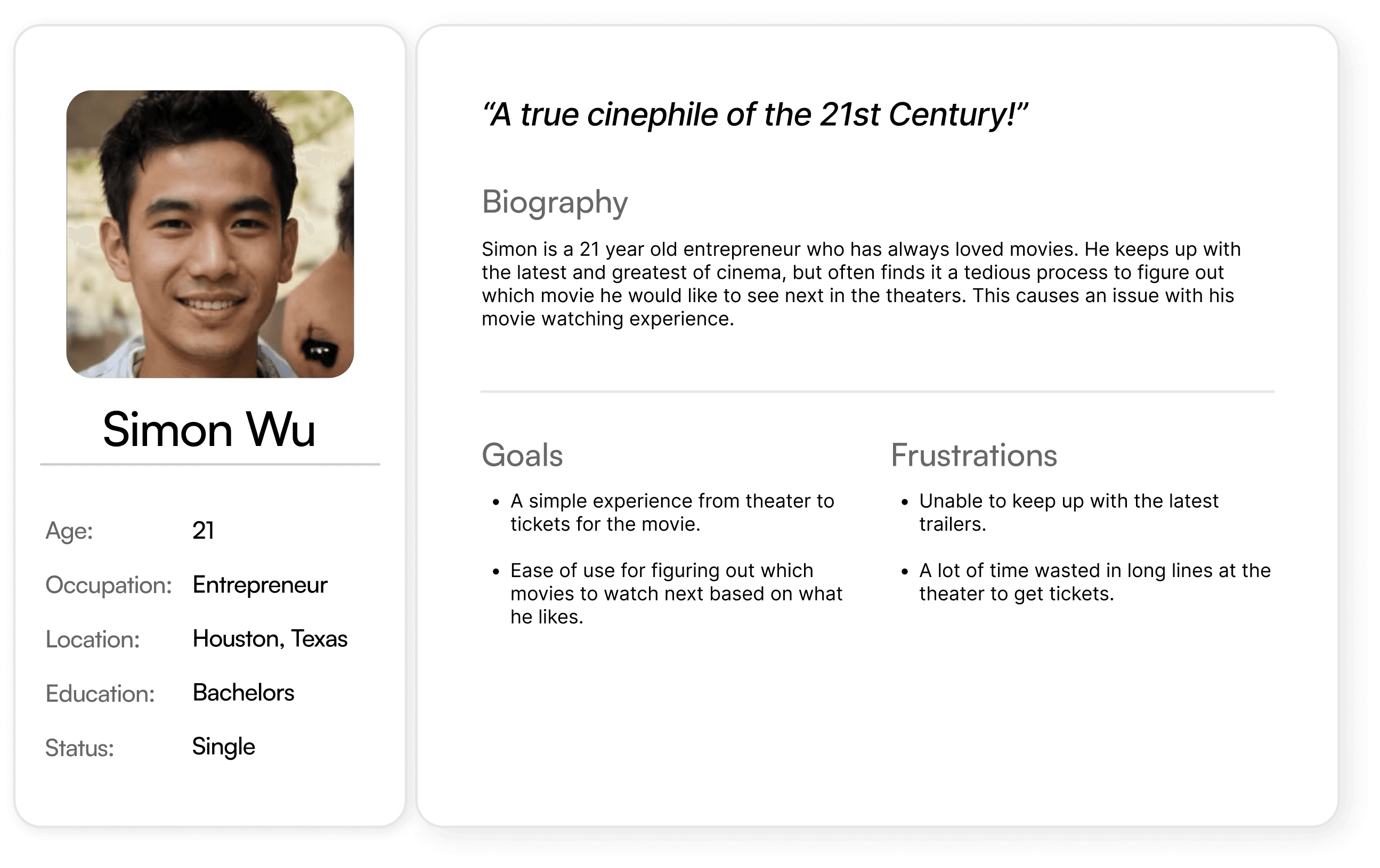
While doing the user research, I conducted a few interviews of participants to empathize and understand their perspective on how they go about viewing trailers and booking their tickets.

Some of the research questions I looked into were as follows:

  • Does a personalized feed help in finding a desired movie?

  • Is booking through the same app a feature the users want?

  • What are the other features that could be missing from this app?

  • Would looking at user reviews for movies help people in making the right decision?

  • Does the app require a social media component to be successful or not?

These were the main pain points that were discovered:

Pain points

  • Unable to keep up with the latest trailers.

  • Cannot browse through movies list to find family friendly movies.

  • Cannot find quick and efficient ways to look for movies to watch in the theaters.

  • Difficulty in finding reliable and up-to-date movie reviews and ratings from diverse sources.

  • Unable to keep up with the latest trailers.

  • Cannot browse through movies list to find family friendly movies.

  • Cannot find quick and efficient ways to look for movies to watch in the theaters.

  • Difficulty in finding reliable and up-to-date movie reviews and ratings from diverse sources.

  • Unable to keep up with the latest trailers.

  • Cannot browse through movies list to find family friendly movies.

  • Cannot find quick and efficient ways to look for movies to watch in the theaters.

  • Difficulty in finding reliable and up-to-date movie reviews and ratings from diverse sources.

  • Unable to keep up with the latest trailers.

  • Cannot browse through movies list to find family friendly movies.

  • Cannot find quick and efficient ways to look for movies to watch in the theaters.

  • Difficulty in finding reliable and up-to-date movie reviews and ratings from diverse sources.

  • Unable to keep up with the latest trailers.

  • Cannot browse through movies list to find family friendly movies.

  • Cannot find quick and efficient ways to look for movies to watch in the theaters.

  • Difficulty in finding reliable and up-to-date movie reviews and ratings from diverse sources.

User insight

"The amount of looking around to figure out  what I want to watch can be overwhelming at times. Even when I'm on Netflix, there are times when I'm trying to find something for 10 minutes and I just can't seem to find anything that interests me."

- UR Participant #2

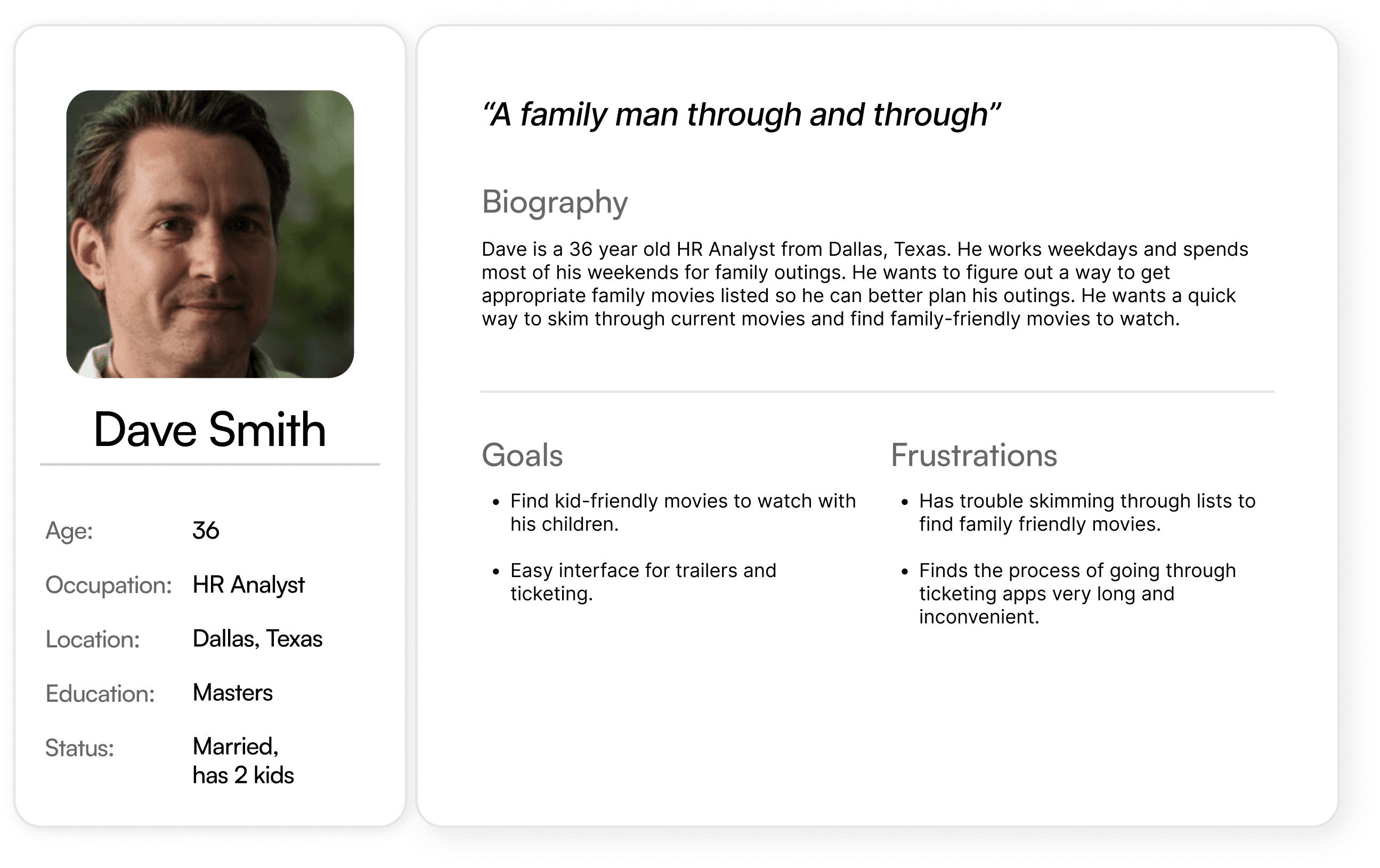
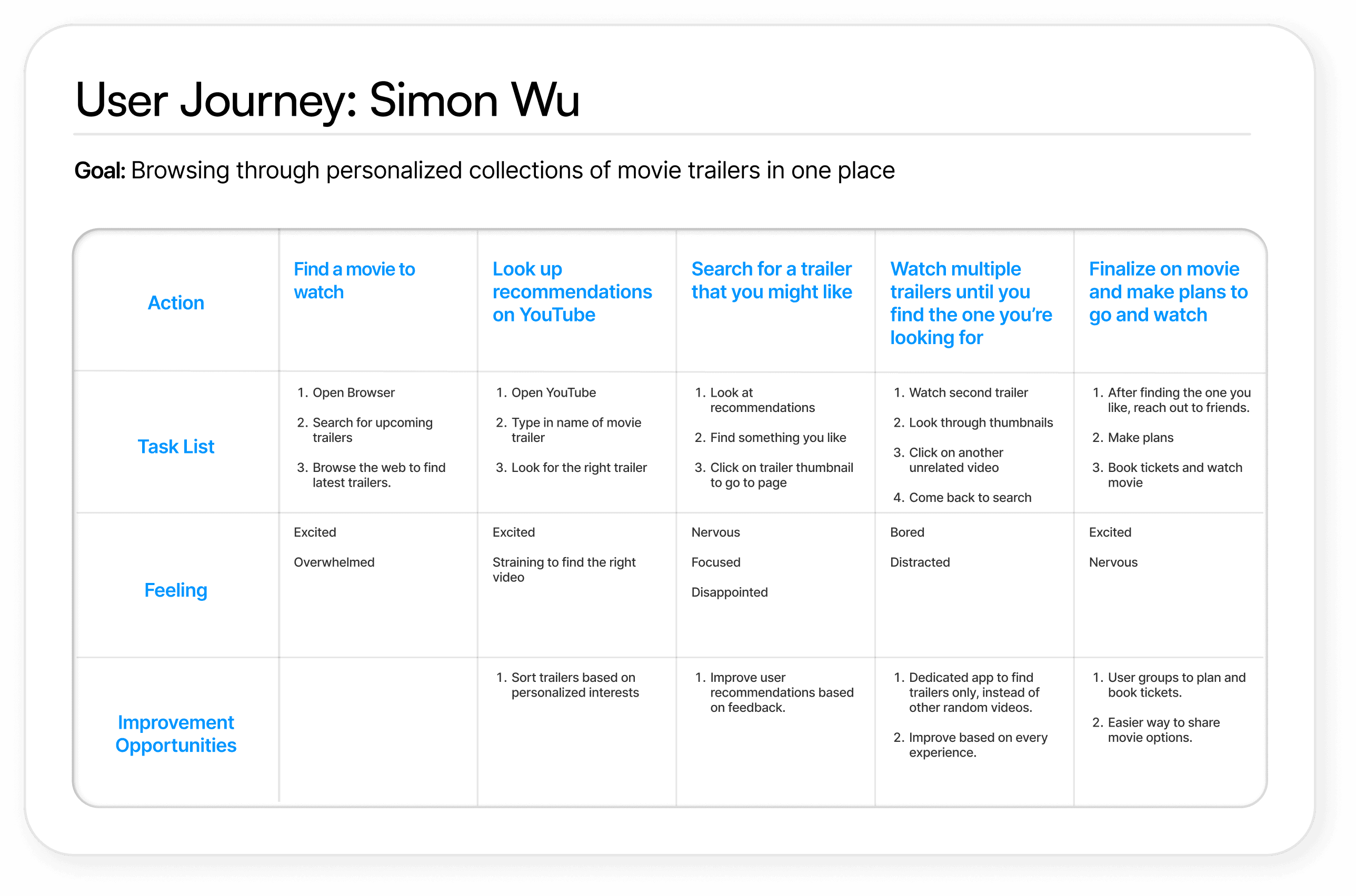
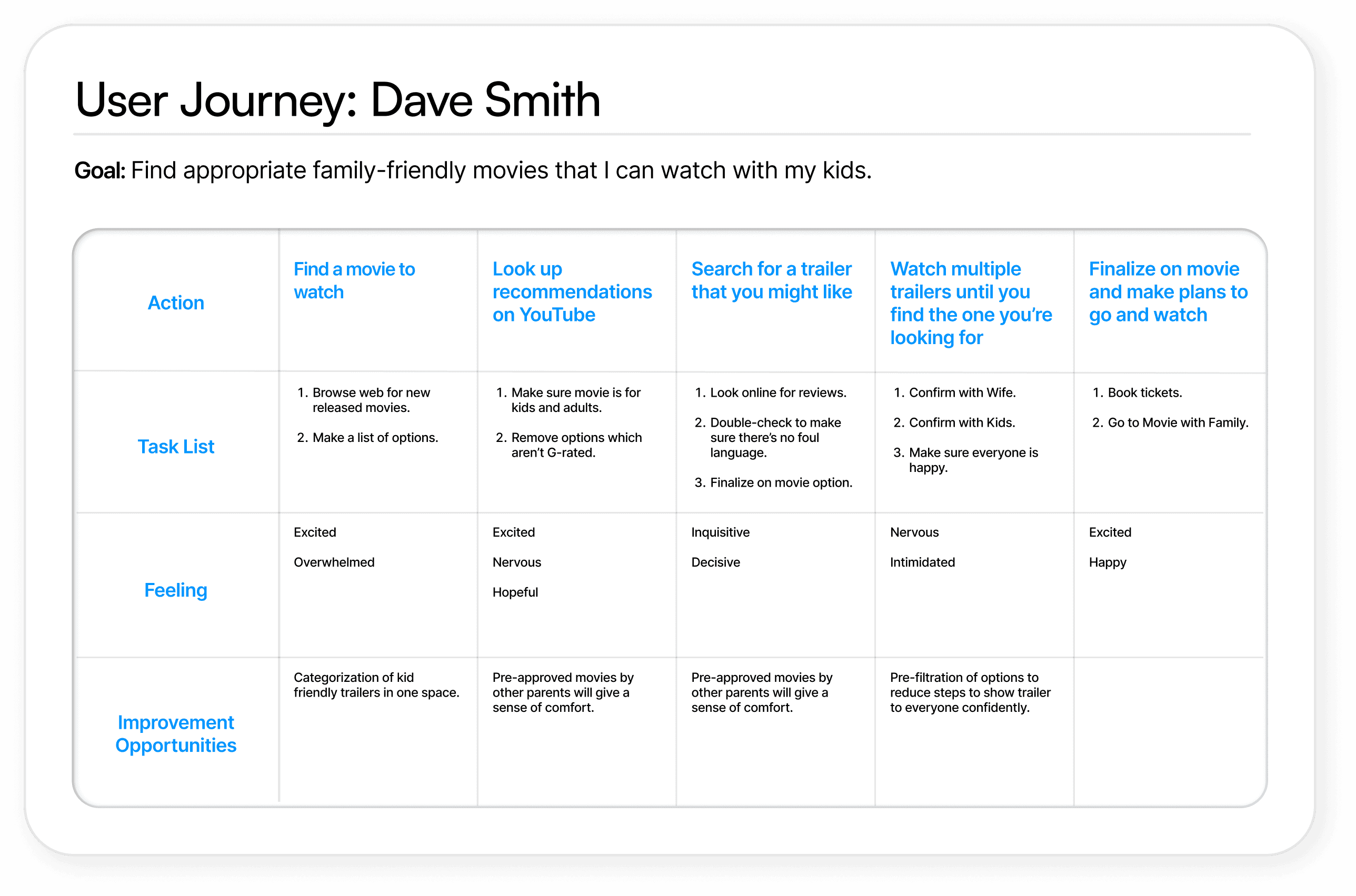
User personas & journey maps
Analysis

Analysis

Analysis

Analysis

After completing the user research phase, I worked on the competitive audit, a SWOT analysis and identified gaps and opportunities.

Competitive analysis

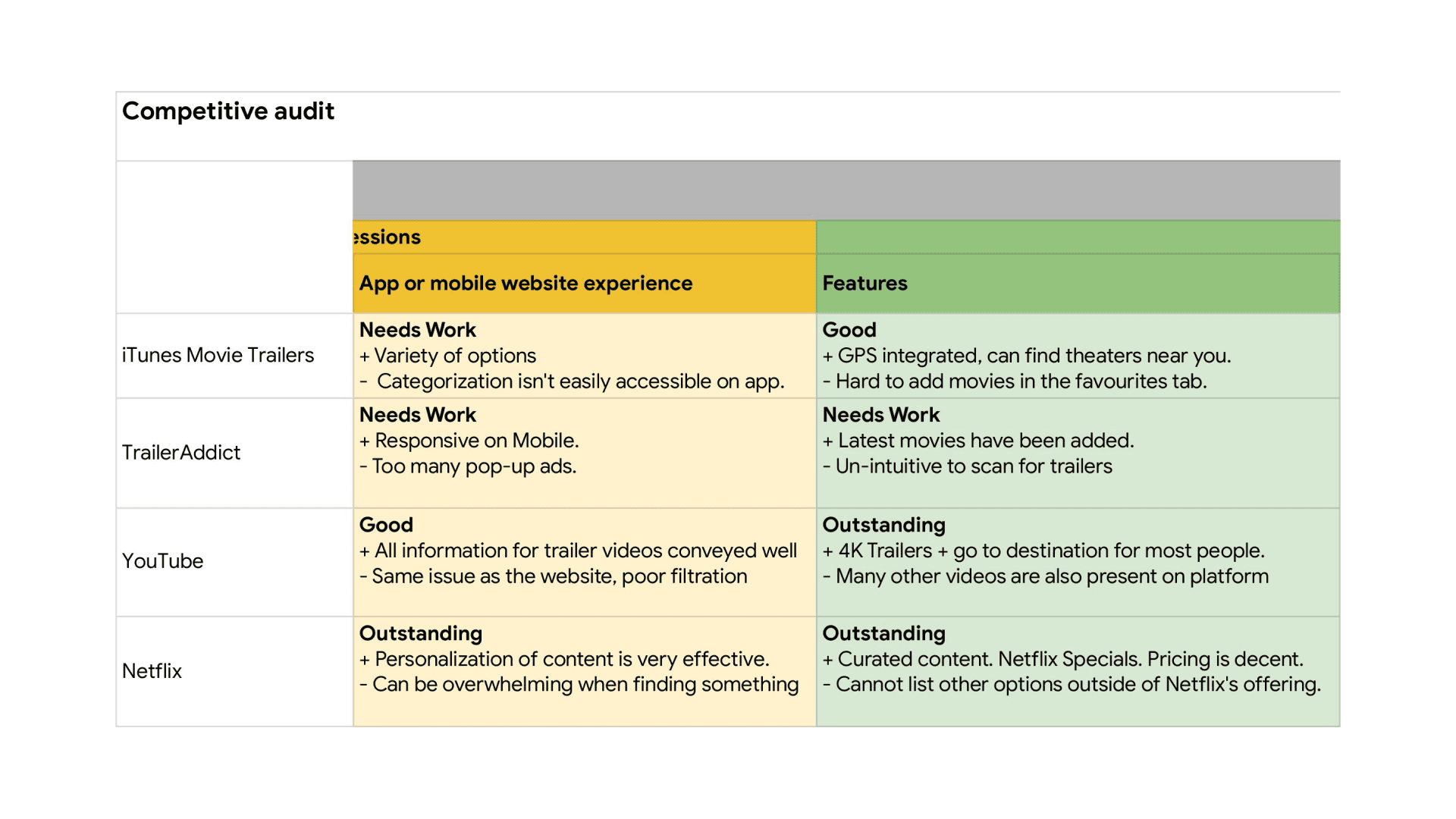
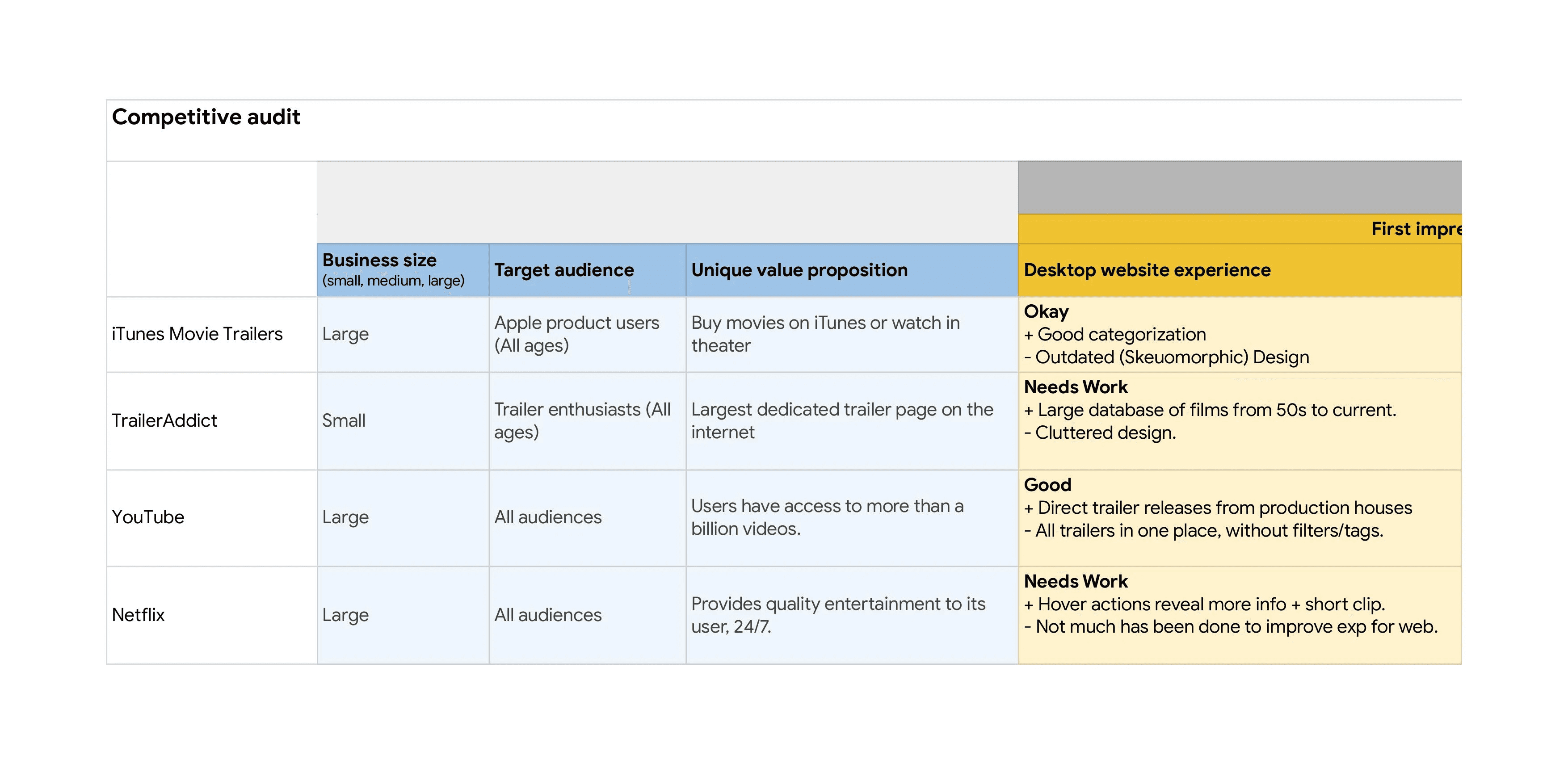
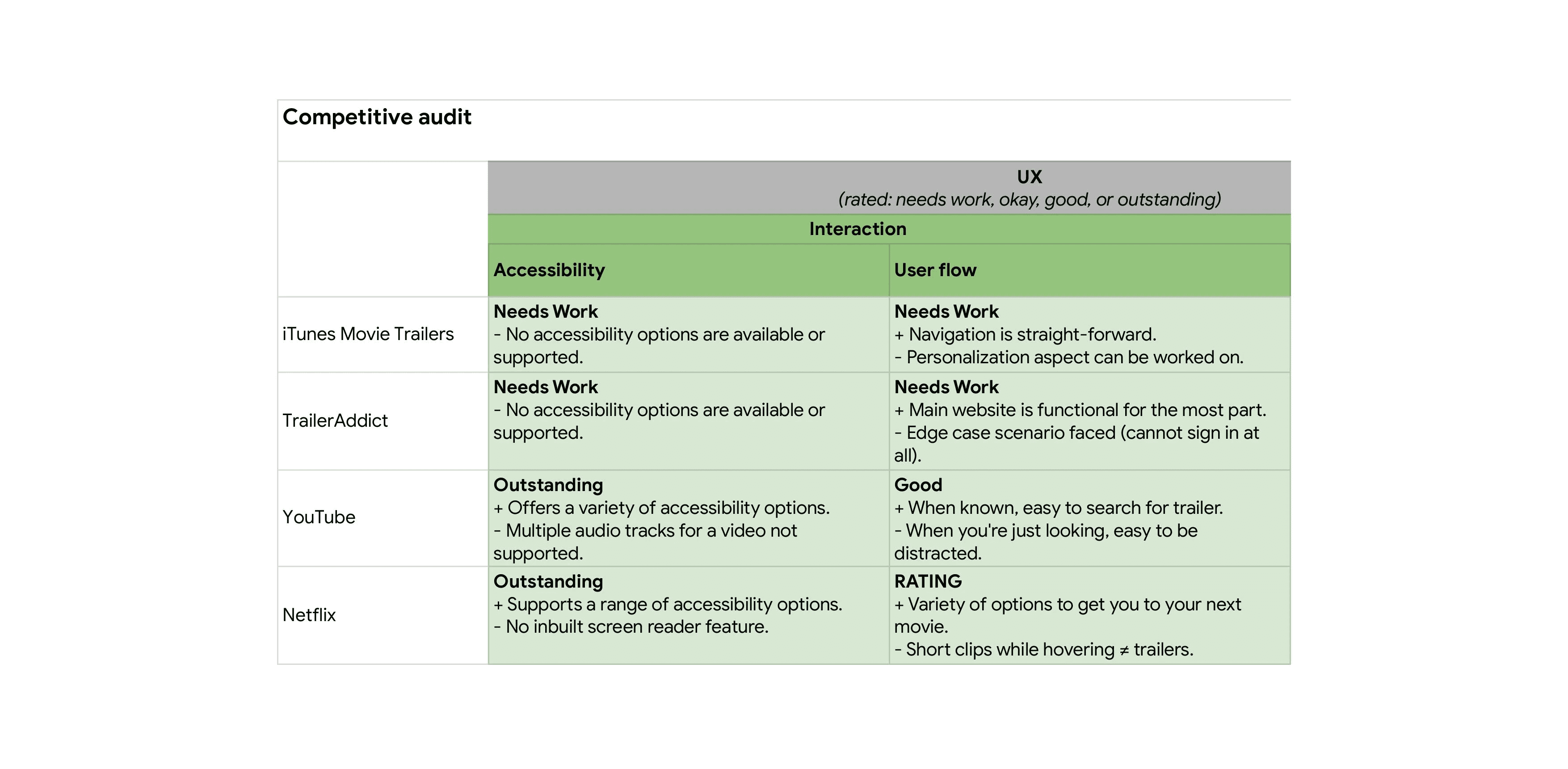
Competitive audit

4 main competitors were researched upon, which consisted of 2 primary and 2 secondary competitors.

Primary key competitors:

Apps which are dedicated towards delivering the latest movie trailers.

Secondary key competitors:

Apps which have a streaming platform but also deliver trailers.

What are the types and quality of competitor's products?

There is a balance of primary and secondary competitors. iTunes Movie Trailers and TrailerAddict deliver trailers only, and are up-to-date in terms of content delivery but not so much in terms of the current design trends.

The secondary competitors, YouTube & Netflix are not just trailer delivery platforms but offer quality of content. On YouTube there’s more quantity and on Netflix there’s more quality to the type of content being offered.

How do they position themselves in the market?

The competitors position themselves to all audiences, but primarily they’re all focused on the 20-50 age group category who are more inclined towards using a smartphone. As the majority of the features being offered in these platforms are based on availability of Internet, it is also targeted towards the first world countries.

Certain features (such as local theaters near you in iTunes Movie Theaters) are only catered to the American market as it’s developed with that target audience in mind.

Strengths and weaknesses

Strengths

iTunes Movie Trailers:
1. Tie up with iTunes Store
2. Access to latest movie theaters
3. Upcoming Movies & Top Charts.

TrailerAddict:
1. Large database of movies.
2. Dedicated space for trailer enthusiasts.

YouTube:
1. Heavy traffic everyday (2nd largest search engine)
2. Direct first uploads from production houses
3. Active users top all other competitors

Netflix:
1. Easy to access and view content
2. Stay updated on the latest movies launching on the platform
3. Ad-free platform.

Weaknesses

iTunes Movie Trailers:
1. Old design of the software is off-putting to new users
2. Difficult to personalize and doesn’t have an algorithm to show what you would like.
3. Can sometimes be difficult to navigate

TrailerAddict:
1. Branding does not exist
2. Mostly has missing content once more info is viewed.
3. Unable to sign in to view personalization offerings.

YouTube:
1. A lot of inappropriate content is uploaded regularly.
2. Free version comes with a lot of ads.
3. Can be very distracting and time consuming.

Netflix:
1. Very high subscription plans (and increase regularly)
2. Is limited to Netflix offerings and cannot view other content.
3. Sometimes it can be a difficult place to navigate and easy to get overwhelmed.

Gaps and opportunities

Gaps

No app at the moment is focused on trailers only with a social media aspect attached to it.

Curated content and watchlists are not implemented together in one space.

Opportunities

A dedicated app for film and cinematography lovers can be created.

A movie-centered application which is focused on getting the best around you, with integration of feedback generated via real user reviews.

Ideation

Ideation

Ideation

Ideation

Ideation

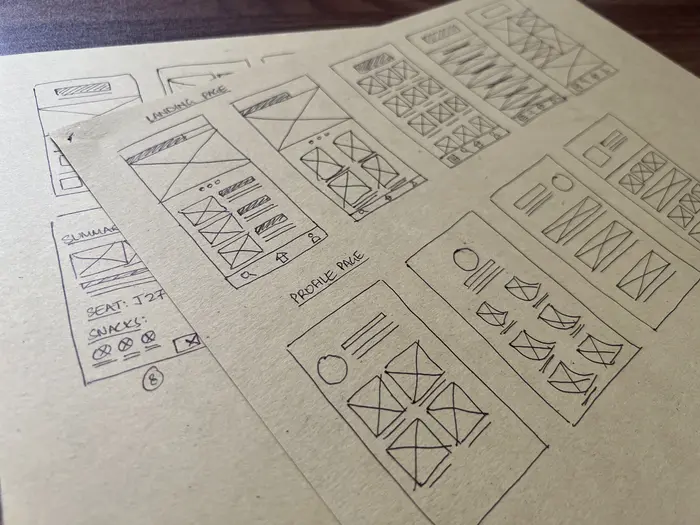
With a basic idea of what the app would look like, I started working on creating paper wireframes to build the first few iteration of the design.

Paper wireframing

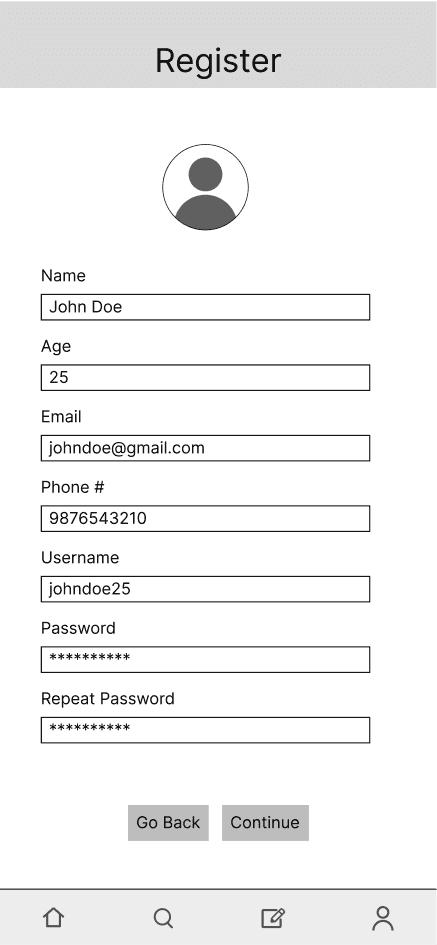
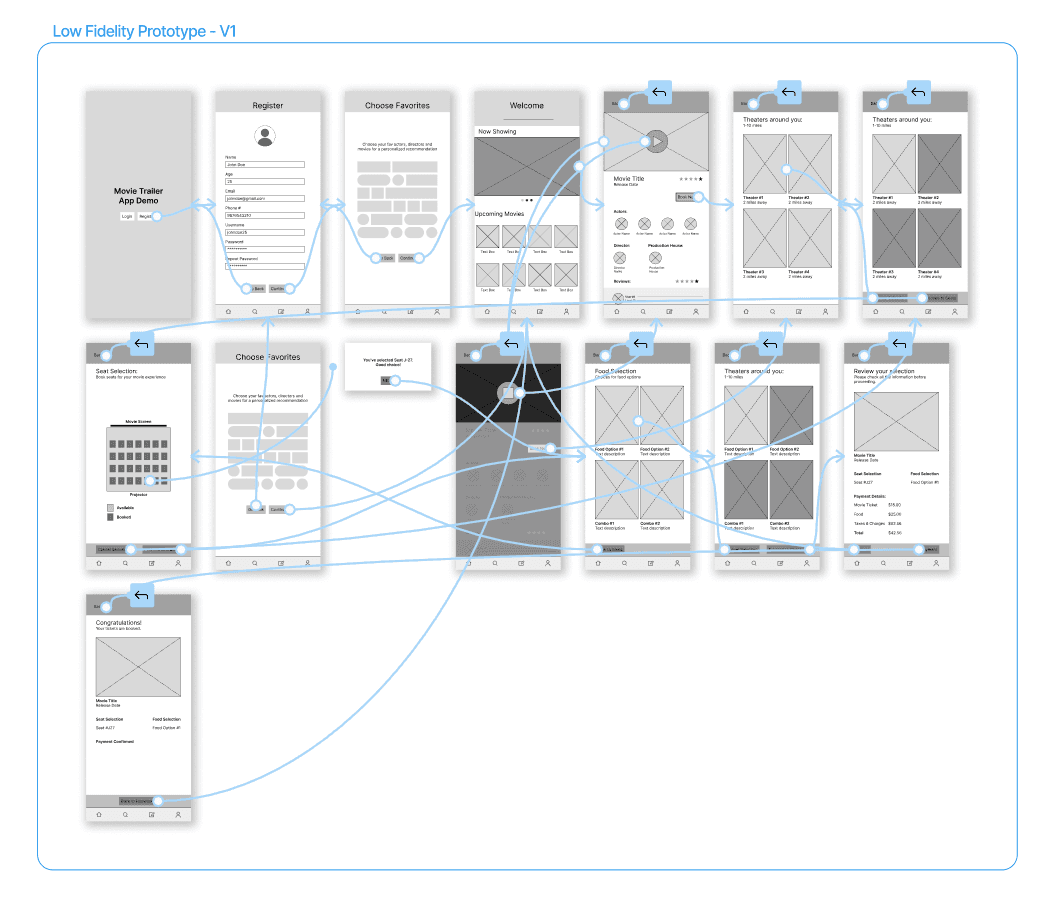
Following visual guidelines, I was able to come up with various possible options for the layout. After figuring out which ones worked best, I started making digital wireframes and low fidelity protoypes for usability testing.
Low fidelity prototype - V1

After creating the first version of the low fidelity prototype, I started planning for the first moderated user study. This was the plan:

5 total participants, between the ages of 24-54.

Study was going to be moderated, and conducted remotely via zoom.

After creating the first version of the low fidelity prototype, I started planning for the first moderated user study. This was the plan:

5 total participants, between the ages of 24-54.

Study was going to be moderated, and conducted remotely via zoom.

After creating the first version of the low fidelity prototype, I started planning for the first moderated user study. This was the plan:

5 total participants, between the ages of 24-54.

Study was going to be moderated, and conducted remotely via zoom.

After creating the first version of the low fidelity prototype, I started planning for the first moderated user study. This was the plan:

5 total participants, between the ages of 24-54.

Study was going to be moderated, and conducted remotely via zoom.

After creating the first version of the low fidelity prototype, I started planning for the first moderated user study. This was the plan:

5 total participants, between the ages of 24-54.

Study was going to be moderated, and conducted remotely via zoom.

KPI's for evaluation:

drop-off rates;
conversion rates;
& system usability scale.
Usability testing

After creating the first version of the low fidelity prototype, I started planning for the first moderated user study.

After creating the first version of the low fidelity prototype, I started planning for the first moderated user study.

After creating the first version of the low fidelity prototype, I started planning for the first moderated user study.

Methodology:

Type:
Moderated remote usability study

Participants:
Five participants, between the ages of 24-54

Script:
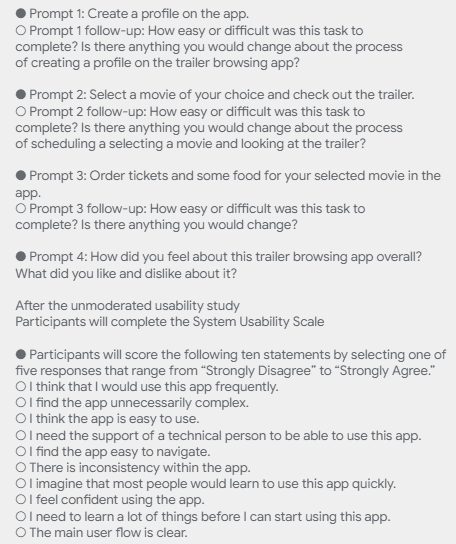
Tasks followed by survey questions, measured by Likert scale (Strongly disagree - Strongly agree)

KPI's for evaluation:

drop-off rates;
conversion rates;
& system usability scale.
Key insights #1

Some of the quantitative feedback that we gathered from the user testing was as follows:

Registration was overwhelming

Users prefer smaller and easier steps for registration instead of all options being presented at once.

More options to choose from

Users would want more options on the homepage to choose their desired movies from.

Enable external notifications

Users wanted an option to send an external notification and/or a more visual confirmation after tickets have been booked.

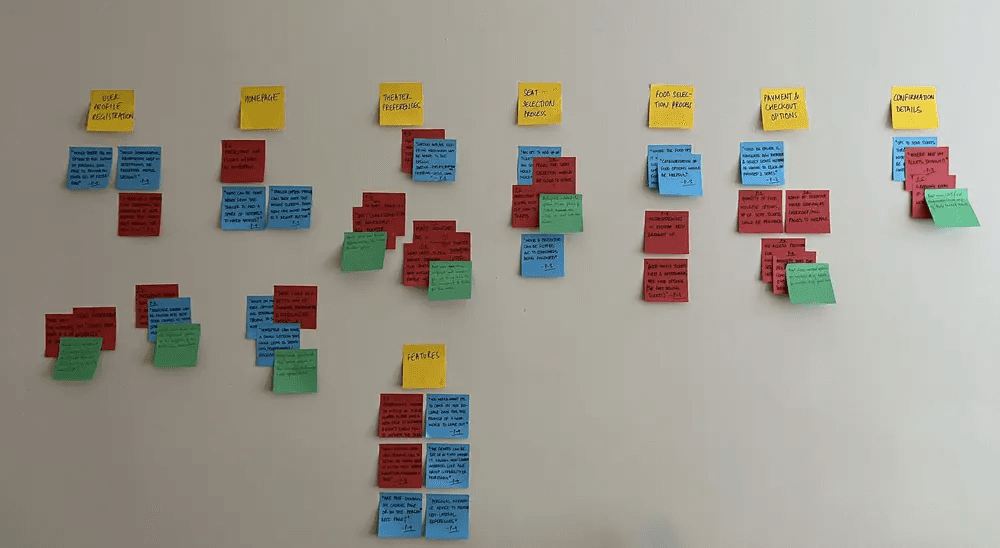
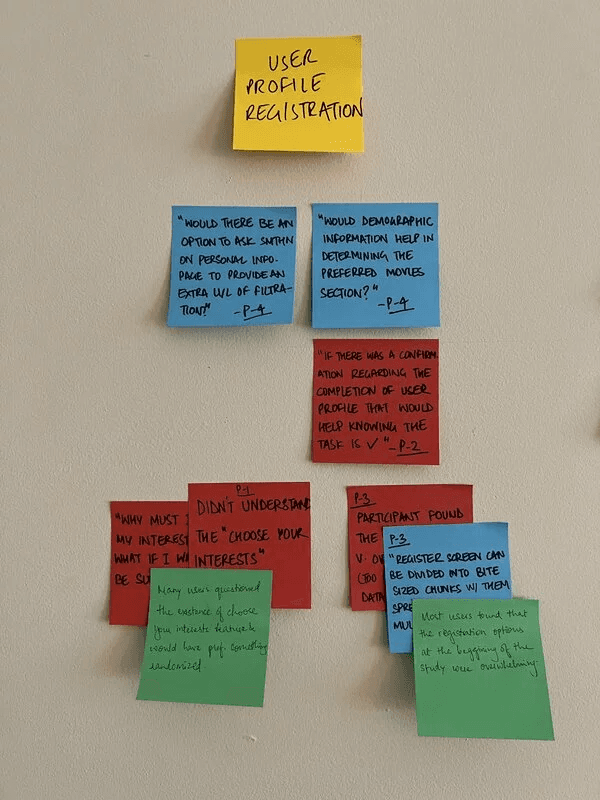
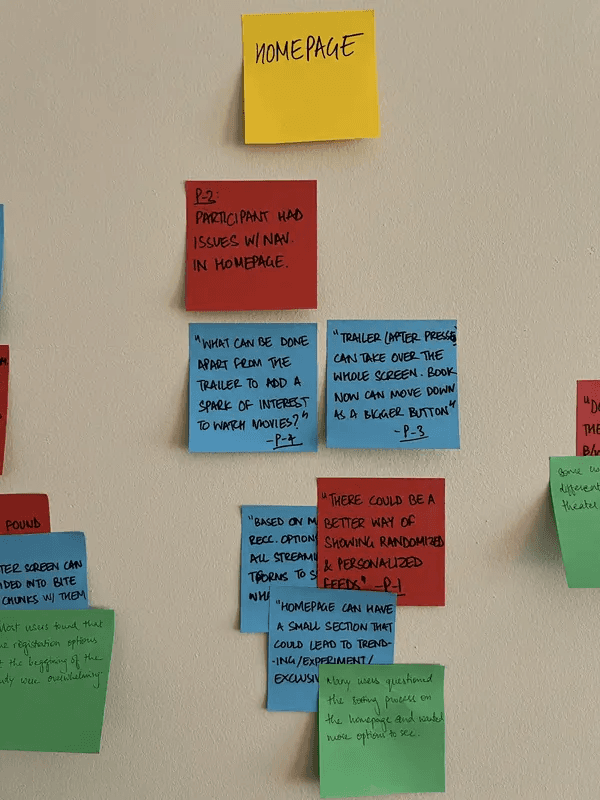
Affinity diagramming

The usability study helped quite a bit, as I got super valuable feedback. To combine all the ideas in one place, I created an affinity diagram to come up with actionable insights.

This exercise created structure around the project and all the ideas were starting to shape up!

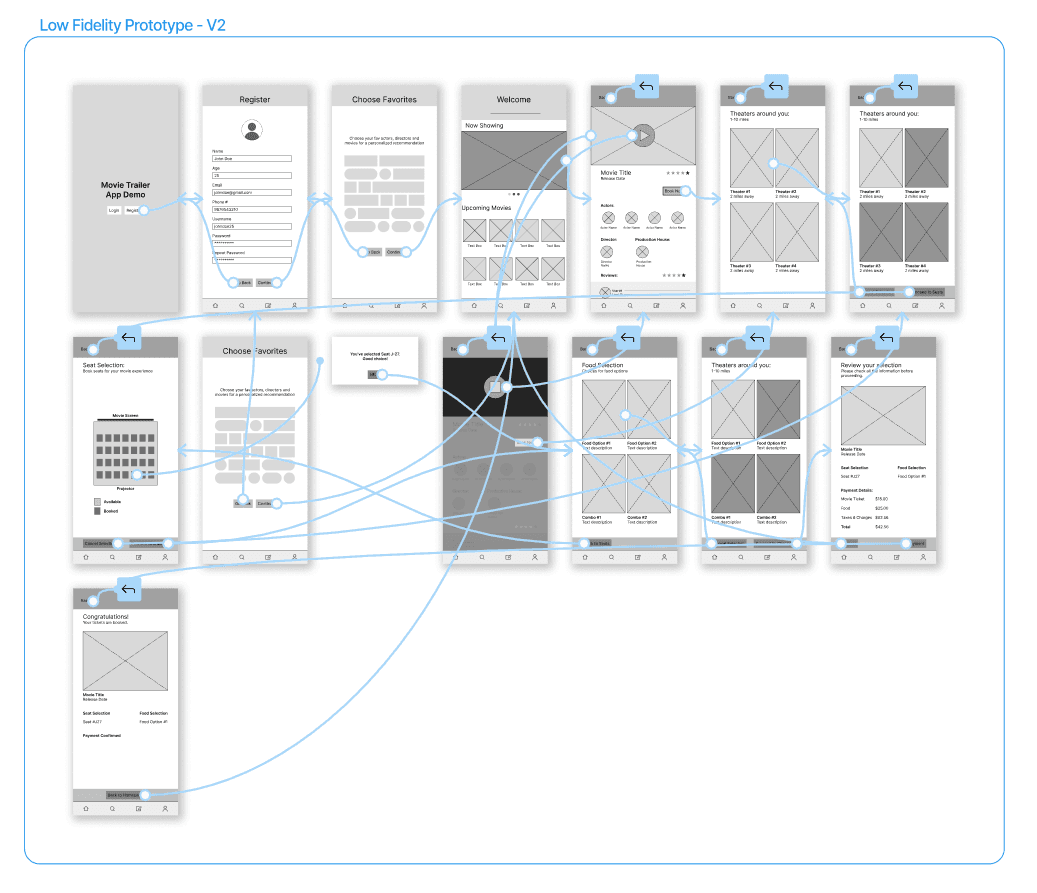
Low fidelity prototype - V2

Based on the collective user feedback from the first usability study, I was able to re-iterate the lo-fi prototype to add features that were lacking in the previous version.

This prototype was also worked on quite a bit more, and the 'look' of the app started falling in place.

After making V2, I conducted a second moderated usability study to get more feedback.

KPI's for evaluation:

drop-off rates;
conversion rates;
& system usability scale.
Key insights #2

Some of the quantitative feedback that we gathered from the user testing was as follows:

Lack of clarity regarding confirmation

Users had trouble understanding if their tickets were booked after going to the main homepage.

Booking detail visibility

85% of the user participants wanted the option to see the details of their booking at all times in the booking process.

Ideation flow

With a basic idea of what the app would look like, I started working on creating paper wireframes to build the first few iteration of the design. Following visual guidelines, I was able to come up with various possible options for the layout. After figuring out which ones worked best, I started making digital wireframes and low fidelity protoypes for usability testing.

Design

Design

Design

Design

Design

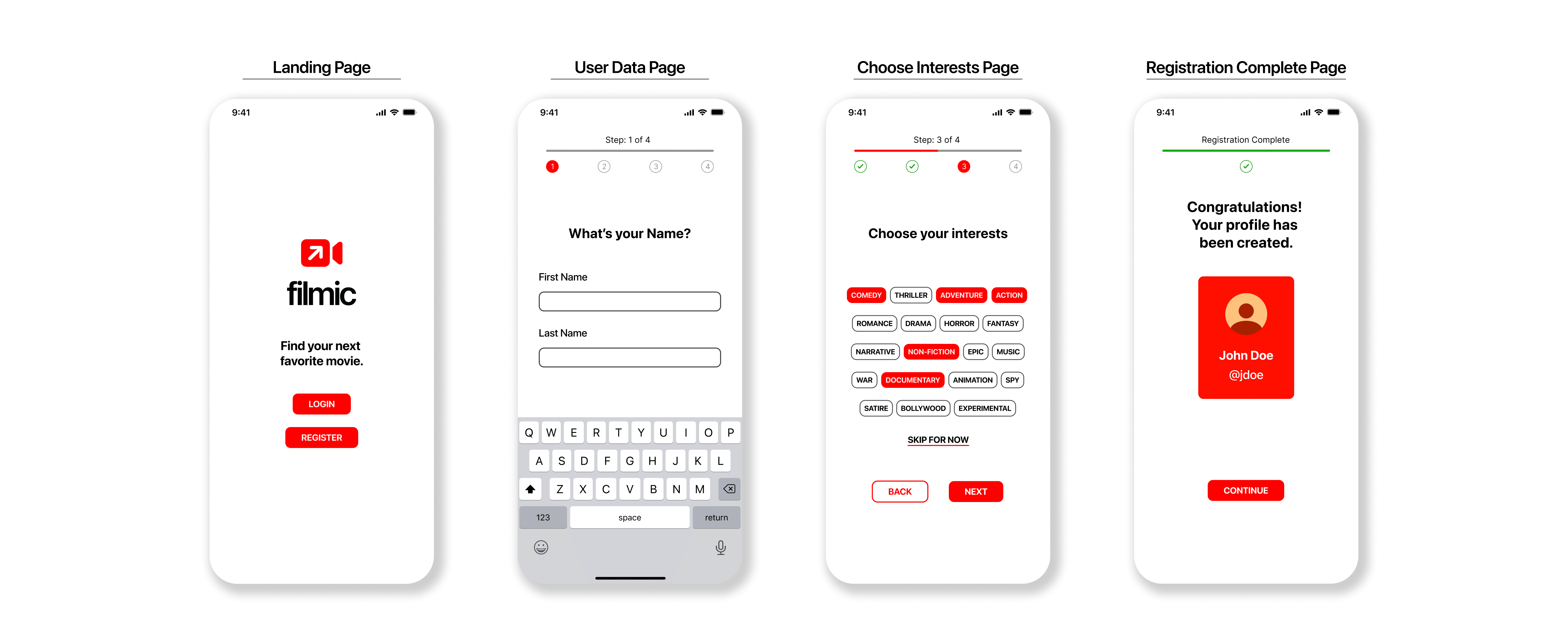
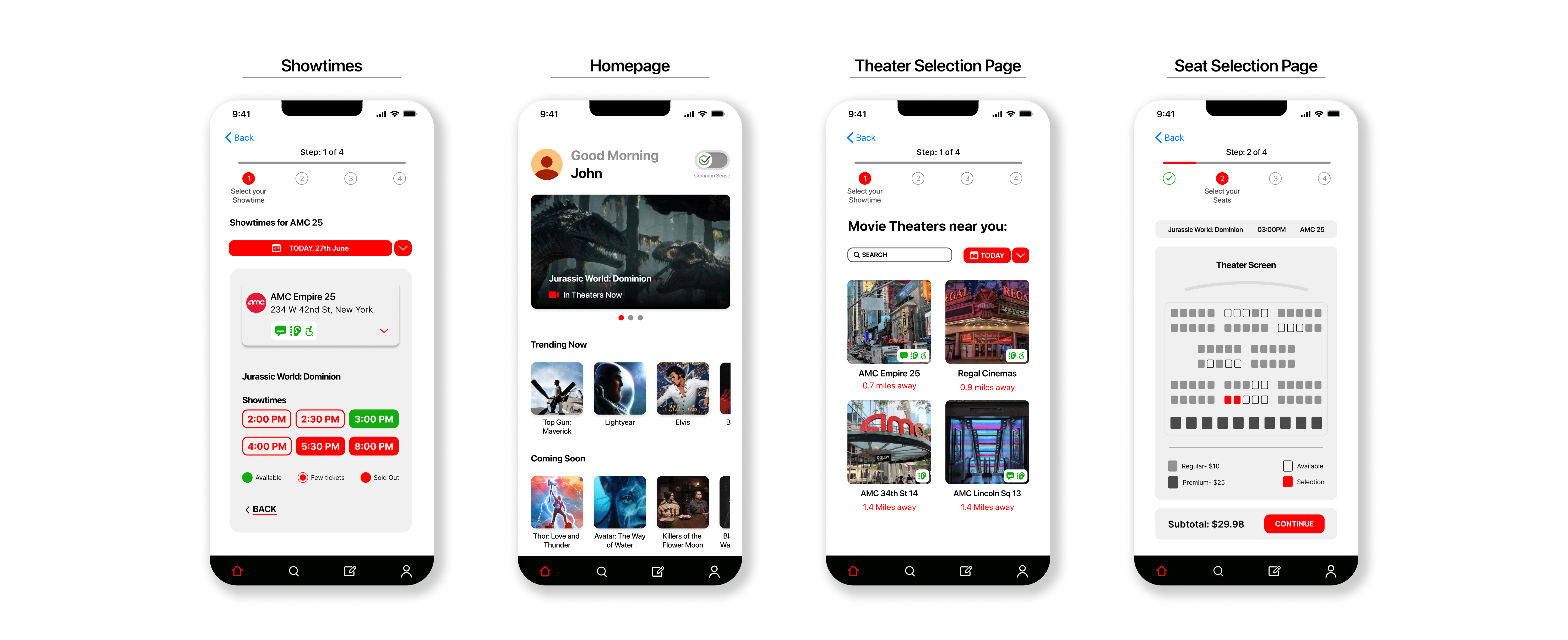
After creating the actionable insights from the second usability study, I started working on the high-fidelity mockups and prototyping what the flow of the app would be like.
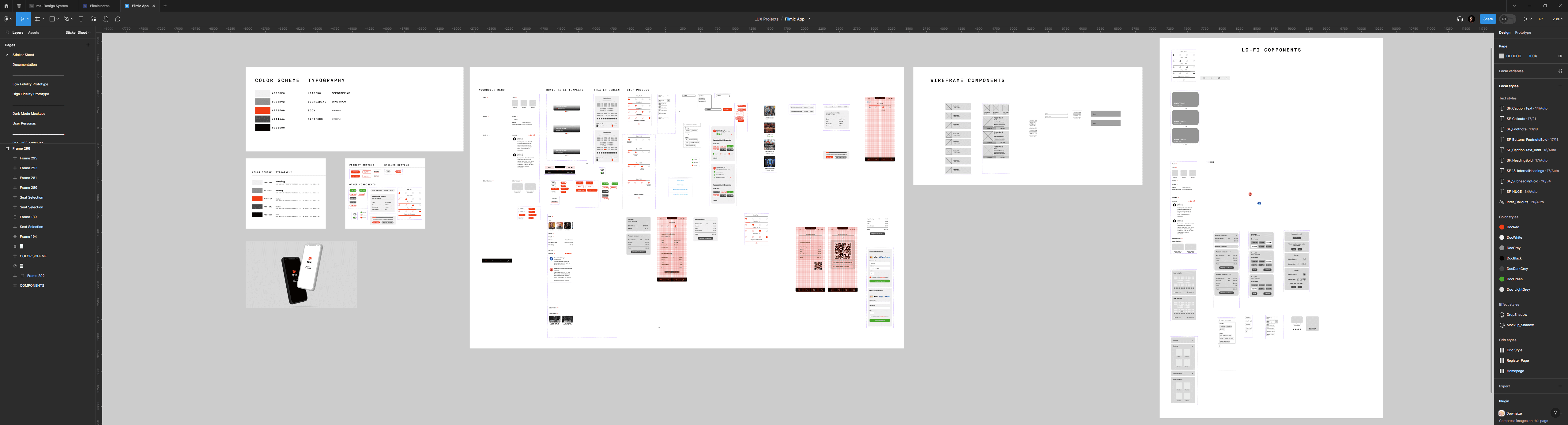
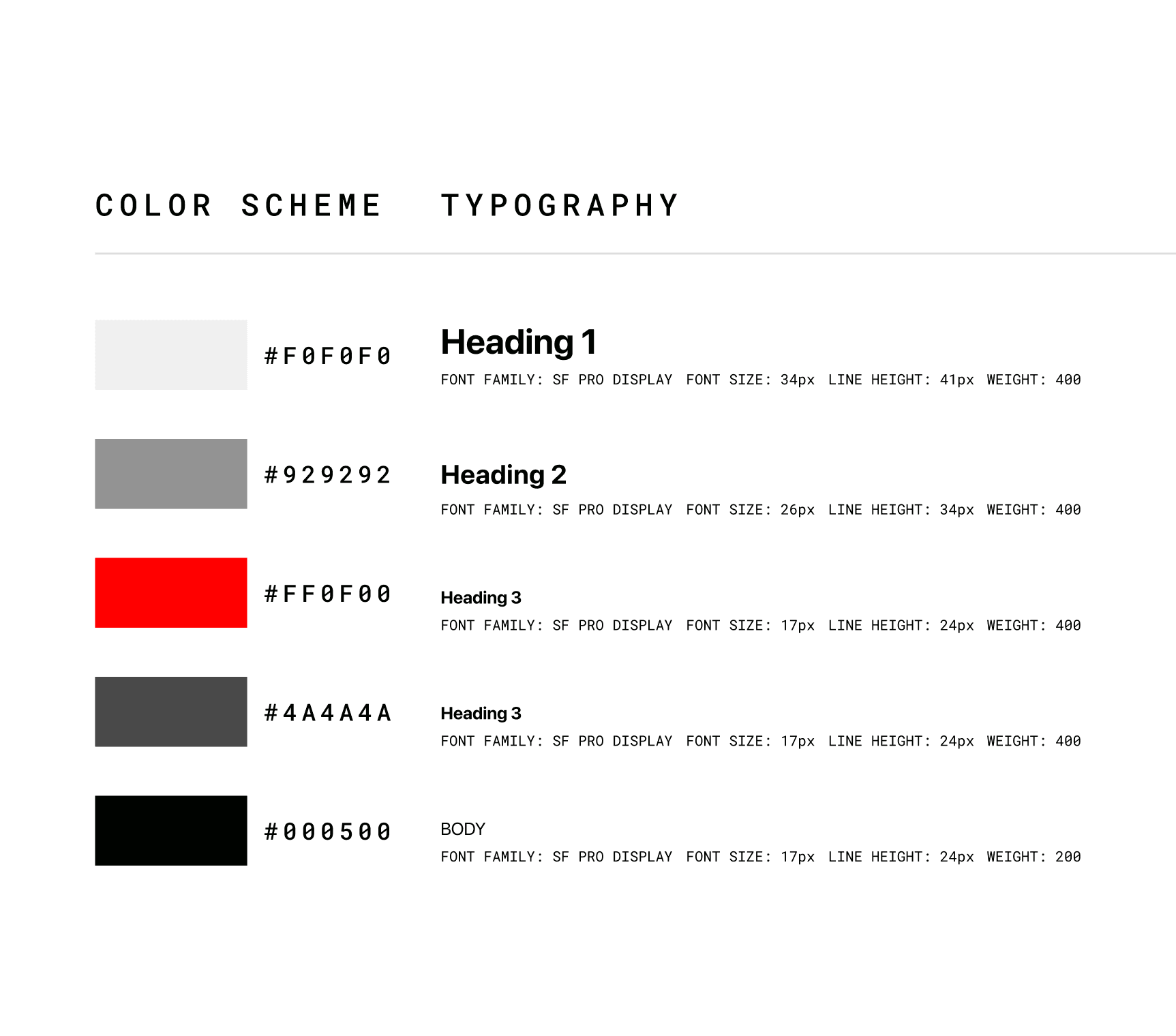
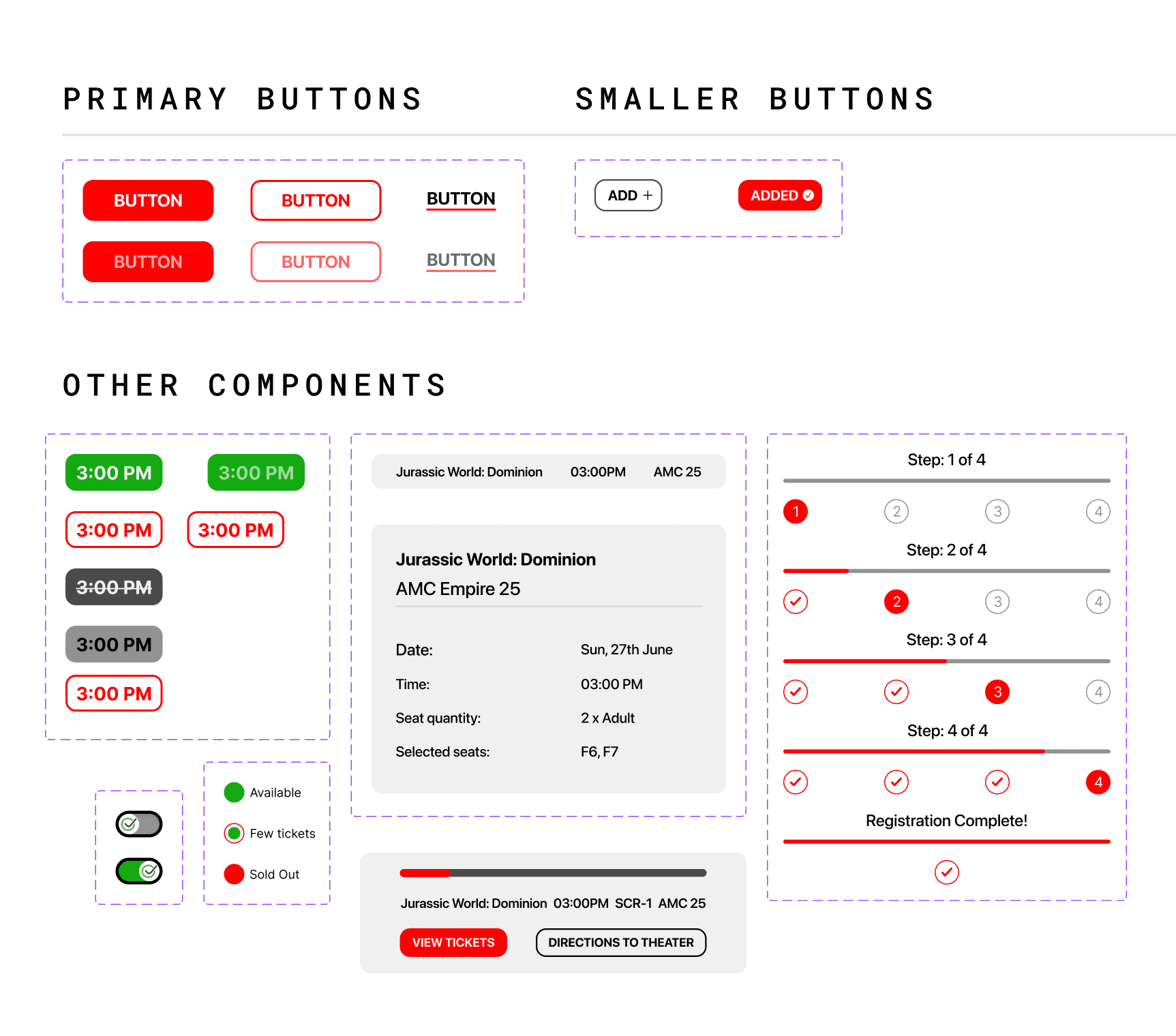
A snippet of the sticker sheet demonstrating the design system that was built for Filmic. This was my first foray into creating a design system, and it helped me understand the importance of having one. It helps in the cohesiveness of the design, and having a huuuge reference sheet you can refer when things go south.

High fidelity prototypes

Insight coverage

Insight coverage

Insight coverage

Here are the key insights that were gathered via user testing and how they were addressed.
User insight - I

Users prefer smaller and easier steps for registration instead of all options being presented at once.

User insight - I

Users prefer smaller and easier steps for registration instead of all options being presented at once.

User insight - I

Users prefer smaller and easier steps for registration instead of all options being presented at once.

Proposed Solution - I

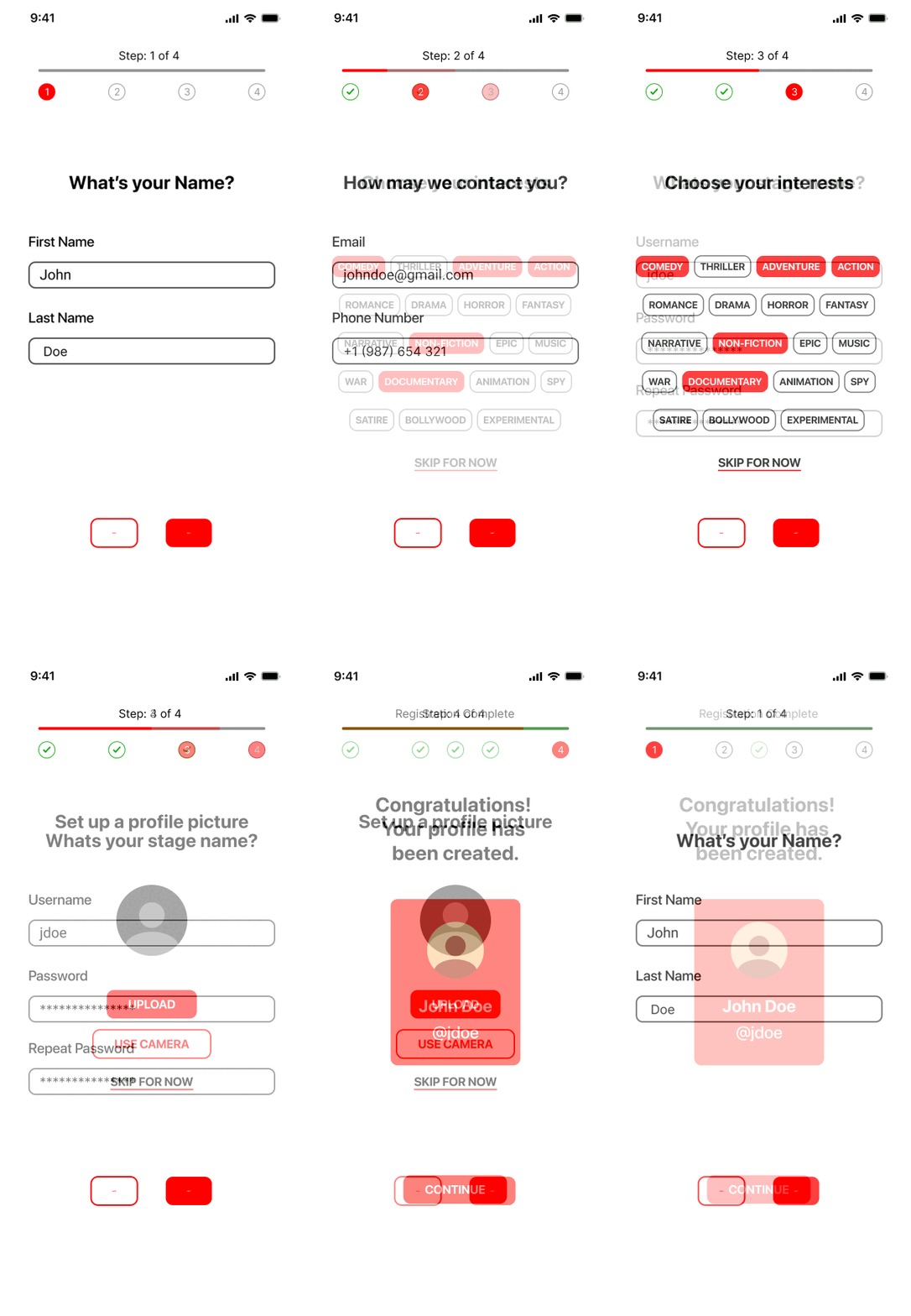
Break the registration into various steps Add an overview for better visibility.

Proposed Solution - I

Break the registration into various steps Add an overview for better visibility.

Proposed Solution - I

Break the registration into various steps Add an overview for better visibility.

User insight - II

Users would want more options on the homepage to choose their desired movies from.

User insight - II

Users would want more options on the homepage to choose their desired movies from.

User insight - II

Users would want more options on the homepage to choose their desired movies from.

Proposed Solution - II

Divided existing movies into various categories, along with commonsense integration.

Proposed Solution - II

Divided existing movies into various categories, along with commonsense integration.

Proposed Solution - II

Divided existing movies into various categories, along with commonsense integration.

User insight - III

Users wanted an option to send an external notification and/or a more visual confirmation after tickets have been booked.

User insight - III

Users wanted an option to send an external notification and/or a more visual confirmation after tickets have been booked.

User insight - III

Users wanted an option to send an external notification and/or a more visual confirmation after tickets have been booked.

Proposed Solution - III

Added an overview + an option to send the tickets to your email/ send via WhatsApp for sharing with others.

Proposed Solution - III

Added an overview + an option to send the tickets to your email/ send via WhatsApp for sharing with others.

Proposed Solution - III

Added an overview + an option to send the tickets to your email/ send via WhatsApp for sharing with others.

User insight - IV

Users had trouble understanding if their tickets were booked after going to the main homepage.

User insight - IV

Users had trouble understanding if their tickets were booked after going to the main homepage.

User insight - IV

Users had trouble understanding if their tickets were booked after going to the main homepage.

Proposed Solution - III

Added a overview section with quick access to tickets & directions to the theater

Improving visibility and encouraging usage of the application.

Proposed Solution - III

Added a overview section with quick access to tickets & directions to the theater

Improving visibility and encouraging usage of the application.

Proposed Solution - III

Added a overview section with quick access to tickets & directions to the theater

Improving visibility and encouraging usage of the application.

User insight - IV

85% of - the user participants wanted the option to see the details of their booking at all times in the booking process.

User insight - IV

85% of - the user participants wanted the option to see the details of their booking at all times in the booking process.

User insight - IV

85% of - the user participants wanted the option to see the details of their booking at all times in the booking process.

Proposed Solution - III

Added a section which gives an overview of the movie name, the start time and theater name

Proposed Solution - III

Added a section which gives an overview of the movie name, the start time and theater name

Proposed Solution - III

Added a section which gives an overview of the movie name, the start time and theater name

Insight - I
Insight - I
Insight - I
Solution - I
Solution - I
Solution - I

Conclusion

Conclusion

Conclusion

Conclusion

Conclusion

Reflection

Some of the quantitative feedback that we gathered from the user testing was as follows:

User centered design

Conducting user interviews and usability studies provided valuable insights that guided the design decisions.

Accessibility and inclusivity

Working on this project helped me understand that accessibility is more about equity, not equality.

Intuitive design

This project highlighted the importance of intuitive navigation to keep users engaged and make content discovery seamless.

Next steps

Some of the quantitative feedback that we gathered from the user testing was as follows:

Non-lateral options

Exploration of how non-lateral choices in the interests can lead to more interesting recommendations.

Streaming services

Integration of various streaming services can be a next step given the sheer amount of users and content that is created and curated for web-based streaming.

Social media

Exploration of how a social aspect of this app can evolve and grow. Maybe something like forums could be interesting to bring together people with similar interests.